Caroline Helwick
December 15, 2011, Volume 2, Issue 18
There was a time when clinical trial results were disseminated mainly through peer-reviewed journals that appeared in your mailbox. Computers and prompt reporting from medical conferences changed that, and same-day postings on medical websites brought “breaking news” a step closer. But the evolution has continued, and today the boom in social media—especially Twitter—has led to real-time data delivery straight from the conference hall to mobile devices anywhere in the world."
Multimedia Experience
 At the 2011 European Multidisciplinary Cancer Congress (EMCC) in Stockholm, organizers for the first time took steps to encourage conference attendees to invest in the social media experience. From Twitter, video blogs, and QR codes (see page 68), to an official Congress App, new communications tools were pervasive.
For example, attendees with iPads and smartphones could navigate via the meeting App rather than tote around the program book. Every exhibitor displayed QR codes, which drove visitors to other resources on their phone or tablet devices. For Novartis-sponsored studies, QR codes allowed attendees to download PDF copies of posters.
A designated “Social Media” area near the exhibits invited attendees to log on to three social networking sites—Twitter, Facebook, and LinkedIn—and three oncology-related websites—those for the European Cancer Organisation (ECCO), the conference, and eCancerHub (www.ecancerhub.eu), a new integrated platform serving providers, scientists, patients, and policymakers across Europe.
An article in the conference newspaper extolled the value of “chatting to the neighbours” via social media, urging oncologists to ramp up their virtual connections, not only to colleagues but to their patients as well. “It is about time the professionals caught up,” the editor noted.
Indeed, Twitter hung in the air at the meeting—quite literally, as several well-placed screens aggregated the Twitter conversation throughout the day.
Over 3,000 Tweets in the Air
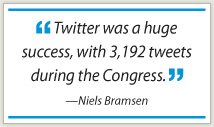
Niels Bramsen, Communication and Marketing Coordinator for ECCO, which oversaw the Social Media kiosk, observed that attendees were “tweeting quite a lot on iPhones, iPads, and Androids….“Twitter was a huge success, with 3,192 tweets during the Congress under the hashtag #emcc2011,” he reported. This included 382 tweets related to gastrointestinal malignancies, 320 for breast, 134 for prostate, and 122 for lung.
 Among the most active and influential Twitter users for the #EMCC2011 hashtag was well known scientist and oncology commentator Sally Church, PhD (@MaverickNY on Twitter), of Icarus Consultants, Jersey City, New Jersey. With over 6,000 followers, she “live tweeted” several sessions from the EMCC 2011 meeting and offered curated conference tweets via her Pharma Strategy Blog page (http://pharmastrategyblog.com).
Stephen Dunn, a journalist for Brandcast Health, a digital, video, and social media health-care agency, kept track of pharma activity, noting that the most mentions were for Novartis at 612, followed by Roche at 49 tweets. Mr. Dunn can be found on Twitter at @brandcasthealth.
“LinkedIn was shown considerable interest, too,” Mr. Bramsen added. “Having launched our LinkedIn groups from scratch a few weeks ago, we received 238 members in the general ECCO group and good numbers of new members in specific track groups.”
Over 2,200 attendees downloaded the ECCO App, opening 69,000 pages of Congress content, he added.
But while some attendees embraced Twitter and other forms of virtual communication, most oncologists received the Congress news the old-fashioned way: by sitting through sessions, Mr. Bramsen acknowledged.
By following the tweets, he said, “We have the impression these are mostly patient advocates (see sidebar on page 56), journalists, and industry. It seems doctors are not tweeting as much.”
Tweeting…and Much More
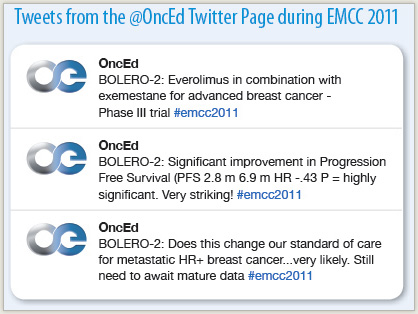
Not so for Sunil Verma, MD, a medical oncologist at Sunnybrook Regional Cancer Center in Toronto. He and his colleague Scott Berry, MD, sent more than 100 tweets from EMCC 2011 sessions to almost 350 followers via the @OncEd Twitter page (see sidebar, page 56)—and also expanding the data on their website, www.oncologyeducation.com, a multidimensional site they created “by physicians, for physicians,” Dr. Verma told The ASCO Post.
“Scott and I are interested in using Web-based technology to inform clinicians. We take the data, synthesize it, and provide our own perspective within a week of a conference. And we are getting hits from 140 countries,” he said.
“People at the meeting can’t be everywhere at once, and they want to know the results of the key trials,” he said.
EMCC 2011 was the “pilot” for what will become a full-on tweeting opportunity at the next ASCO Annual Meeting, he added, when Drs. Verma and Berry will enlist other physicians for comprehensive meeting coverage. ■
Disclosure: Mr. Bramsen and Drs. Verma and Berry reported no potential conflicts of interest.